 Tailwatch
Know when the aircraft you care about are flying.
Tailwatch is a native Mac app that watches your short list of aircraft and tells you when they take off and land. No ads, no account, no subscription.
Join the BetaRequires macOS 14 (Sonoma) or later.
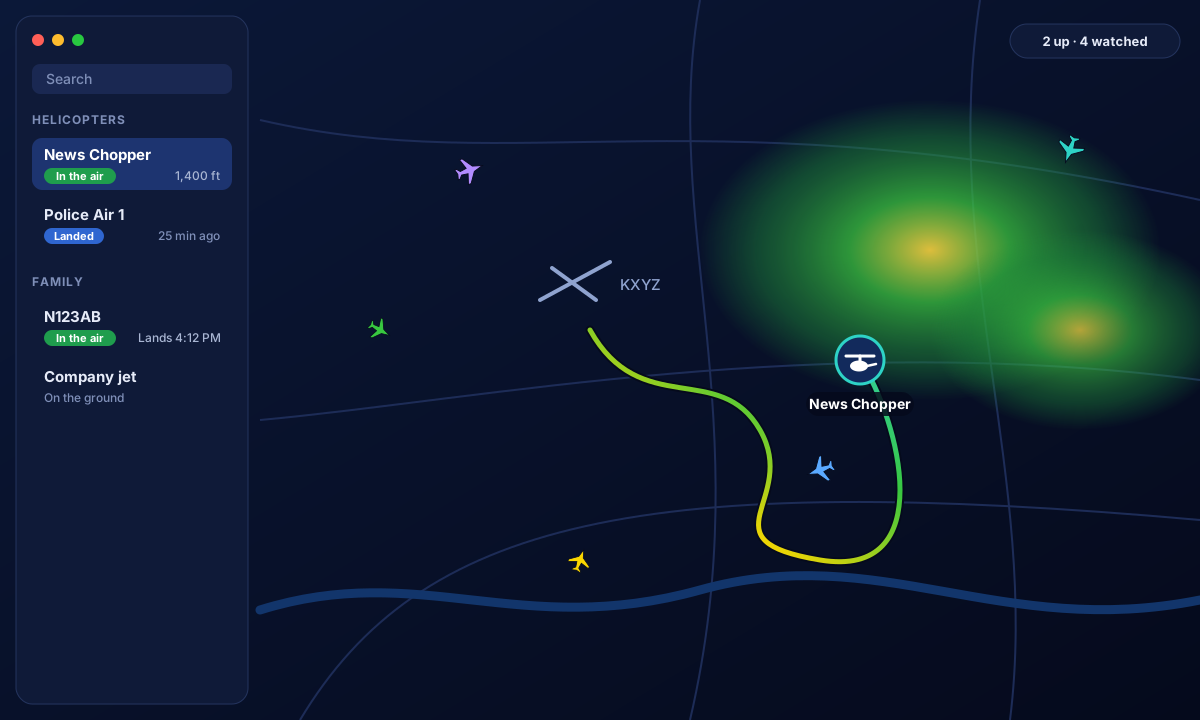
Made for watching a few aircraft closely
Flight tracking websites show you everything. Tailwatch keeps an eye on the handful you actually follow.
News and police helicopters
Hear a helicopter overhead? See which one it is, where it has been circling, and get an alert the next time it lifts off.
A company or family plane
Add a tail number once. Tailwatch tells you when it takes off, where it looks to be headed, and when it lands.
Airport and weather watchers
Traffic around your airport, live weather radar, National Weather Service warnings and flight restrictions, on one map.
People with their own receiver
Point Tailwatch at your PiAware, adsb.im or readsb receiver for updates every second or two, with no daily limit.
What it does
A watchlist with alerts
Follow aircraft by tail number, callsign or hex code. Get a notification on takeoff, landing, an expected arrival, or an emergency squawk, with quiet hours for overnight.
A live map
Each flight draws a trail colored by altitude, so climbs, descents and circling are obvious. Turn on Traffic to see everything else nearby, and click any aircraft to see its flight so far.
Weather radar and warnings
US weather radar under the aircraft, down to single-site detail when you zoom in, plus National Weather Service warnings drawn on the map and an optional alert for your Home.
Flight restrictions and airports
FAA temporary flight restrictions with their altitudes and times, and airports and heliports with runways. Both help explain why an aircraft is where it is.
A flight log
Tailwatch keeps each watched aircraft's recent flights on your Mac: when it left, where it went, and the route it flew. Add your own notes and links to any aircraft.
In the menu bar
Close the window and Tailwatch keeps watching from the menu bar, where a glance shows who is in the air.
Bring your own data
Tailwatch reads public ADS-B data, the position reports most aircraft broadcast. You choose where it comes from.
Works right away
Out of the box it uses adsb.lol, a free, community-run network. The free tier allows 500 requests a day, so updates come every few minutes.
Faster with a free key
An adsb.lol API key raises the daily allowance, and feeding the network from your own receiver raises it much further.
Best with your own receiver
A small radio on your network hears nearby aircraft directly. Tailwatch reads it every second or two, with no limit.
One price. No subscription, no ads.
$19.99
A one-time purchase (placeholder price). The data sources are free; Tailwatch never sells or shares anything about you.
Join the BetaQuestions
Is the flight data free to use?
Yes. Tailwatch reads adsb.lol, a free community network, and never charges for data. The free tier has a daily limit, so updates are slower until you add a free key or your own receiver.
Does it work outside the US?
Aircraft tracking, traffic, airports and alerts work anywhere there is ADS-B coverage. Weather radar, National Weather Service warnings and FAA flight restrictions are US only.
Can I track any plane?
You can track aircraft that broadcast ADS-B and are within range of a receiver that shares its data. Most airliners, business aircraft and helicopters do. Some military and older aircraft don't, and coverage is thin over oceans and remote areas.
What about private jets?
Some owners ask the FAA to limit how their aircraft are shown (a program called LADD), and some use temporary, rotating identifiers (PIA). Tailwatch hides LADD aircraft from general traffic by default. If you add one to your own watchlist it is tracked, since the positions are publicly broadcast. Aircraft using rotating identifiers usually can't be followed by tail number at all.
Do I need an antenna?
No. Tailwatch works with online data alone. A receiver is optional and makes updates faster for aircraft near you.
Is there an iPhone version?
Not yet. Tailwatch is a Mac app for now.
Does it collect my data?
No. There is no account and no analytics in the app. Your watchlist, places, notes and flight history stay on your Mac. See the privacy policy for exactly which services the app contacts.
Which Macs does it run on?
Any Mac running macOS 14 (Sonoma) or later.